App Store listings, localized.
Loci translates your App Store Connect metadata into all 50 languages, checks every limit and spelling rule, and pushes it back to App Store Connect in one click.

Mac app · macOS 15 or later
€8.99 once, no subscription
30/30 Headline, as App Name
162/170 Intro, as Promo Text
One sample listing, five languages. Switch fields, then fix the one that ran over.
limit 30 characters
en-USRetro print effects for photos
30/30
de-DERetro-Druckeffekte für Fotos
28/30
fr-FREffets d’impression rétro pour
photos7 over.
37/30
ja写真にレトロな印刷エフェクト
14/30
pt-BREfeitos de impressão retrô
26/30
What Loci is
12/30 Subtitle
Loci is a macOS app by Digital Karbs that localizes App Store listings. It connects to App Store Connect with your own API key, translates every metadata field into any of the 50 App Store languages, checks character limits, keyword rules and regional spelling, and pushes the result back. Translation is free and on-device with Apple Translation for the languages macOS supports, or uses your own Claude, OpenAI or Gemini key for all 50. Loci costs €8.99 once on the Mac App Store, with no subscription and no account.
It edits listings for iPhone, iPad, Mac, Apple TV, Apple Watch and Vision Pro apps. It doesn't touch the strings inside your app; those stay in Xcode.
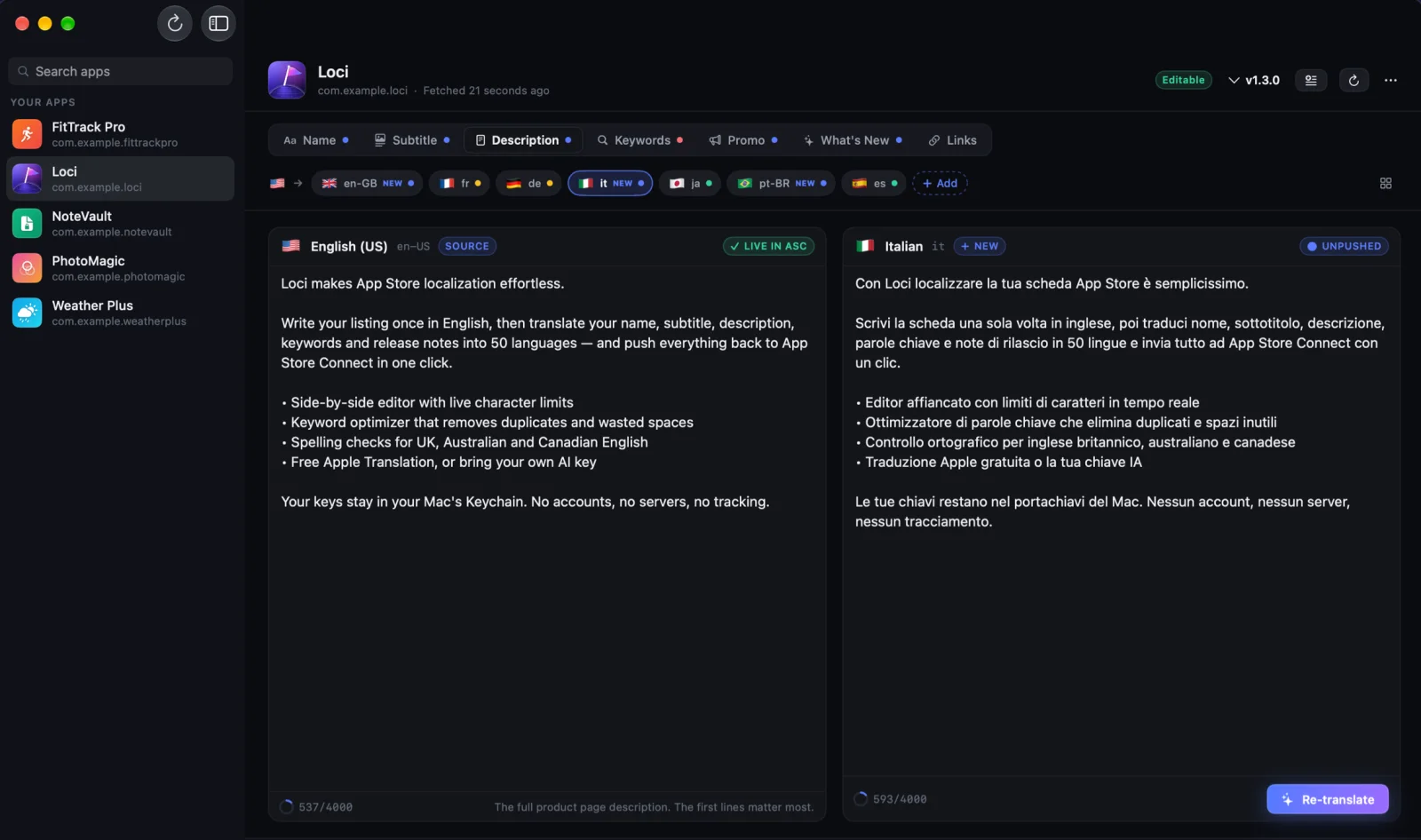
Every field, every language
27/30 Subtitle
App Store Connect lets you localize six text fields per language, plus Game Center. Loci handles all of them, with the limits Apple enforces. Details in our App Store character limits guide.
| Field | Limit | App Store search | What Loci does |
|---|---|---|---|
| App Name | 30 | Indexed | Translated, then checked against the limit |
| Subtitle | 30 | Indexed | Translated, then checked against the limit |
| Keywords | 100 | Indexed, never shown | Localized per market, duplicates and spaces removed |
| Promotional Text | 170 | Not indexed | Can be pushed without a new version |
| Description | 4,000 | Not indexed | Translated with your app's context |
| What's New | 4,000 | Not indexed | Translated for each new version |
| Game Center | — | Shown in the Games app | Achievements, leaderboards and achievement images |
Checked before Apple sees it
28/30 Subtitle
Review & Push lists every change by language. Anything that would fail is flagged with a fix, and fields that still fail are held back instead of rejected.
- Character limits
- Every field, every language, counted the way App Store Connect counts.
- Keyword rules
- Duplicates, spaces after commas and words already in your name or subtitle.
- Regional spelling
- US spelling in English (UK), Australia or Canada, fixed in one click.
- Outdated text
- Translations made from English you've since changed are marked Outdated.
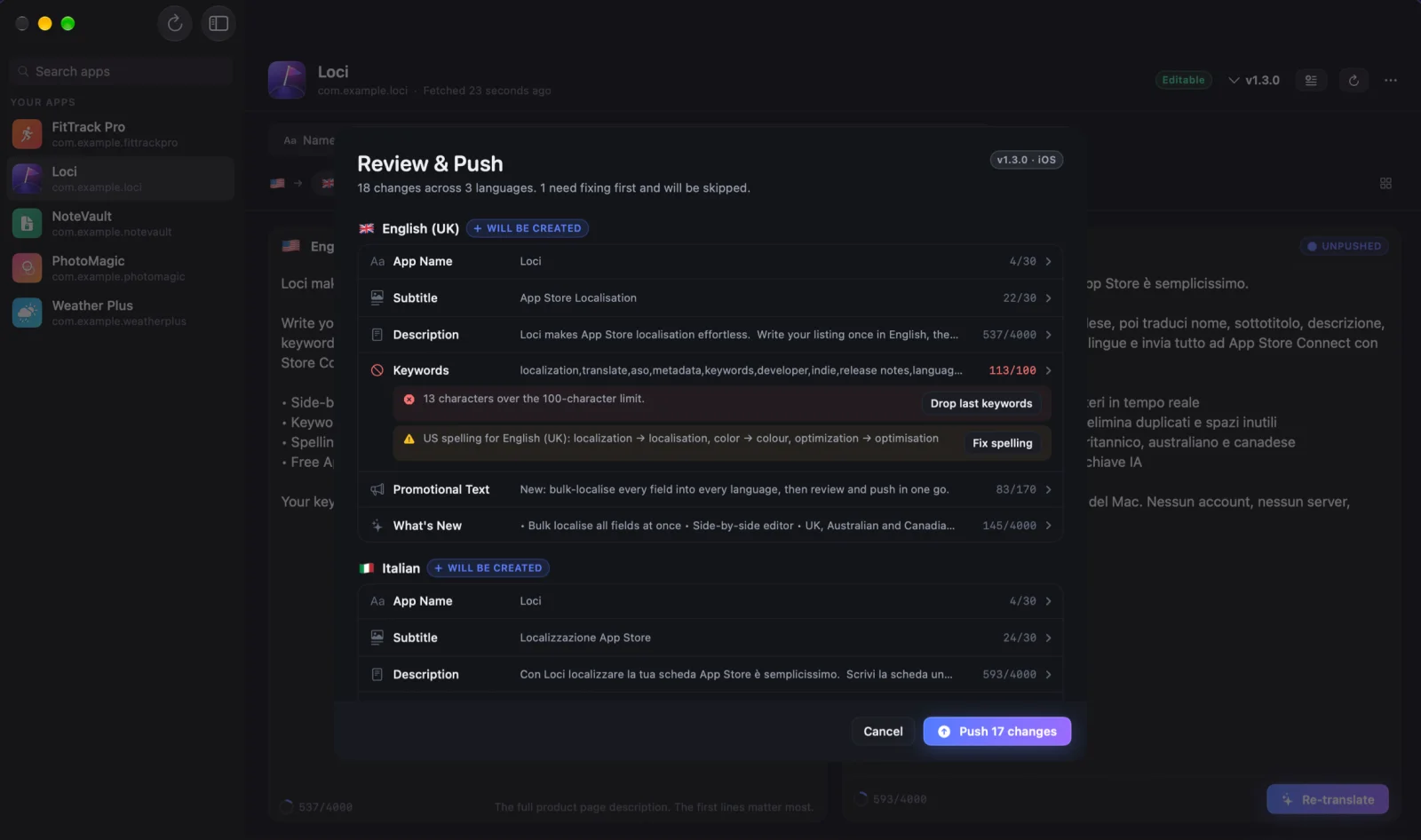
From English to 50 languages
28/30 Subtitle
- Step 1
Connect your account
Create an App Store Connect API key, paste the Issuer ID and Key ID, and add the .p8 file. It's stored in your Mac's Keychain.
- Step 2
Translate
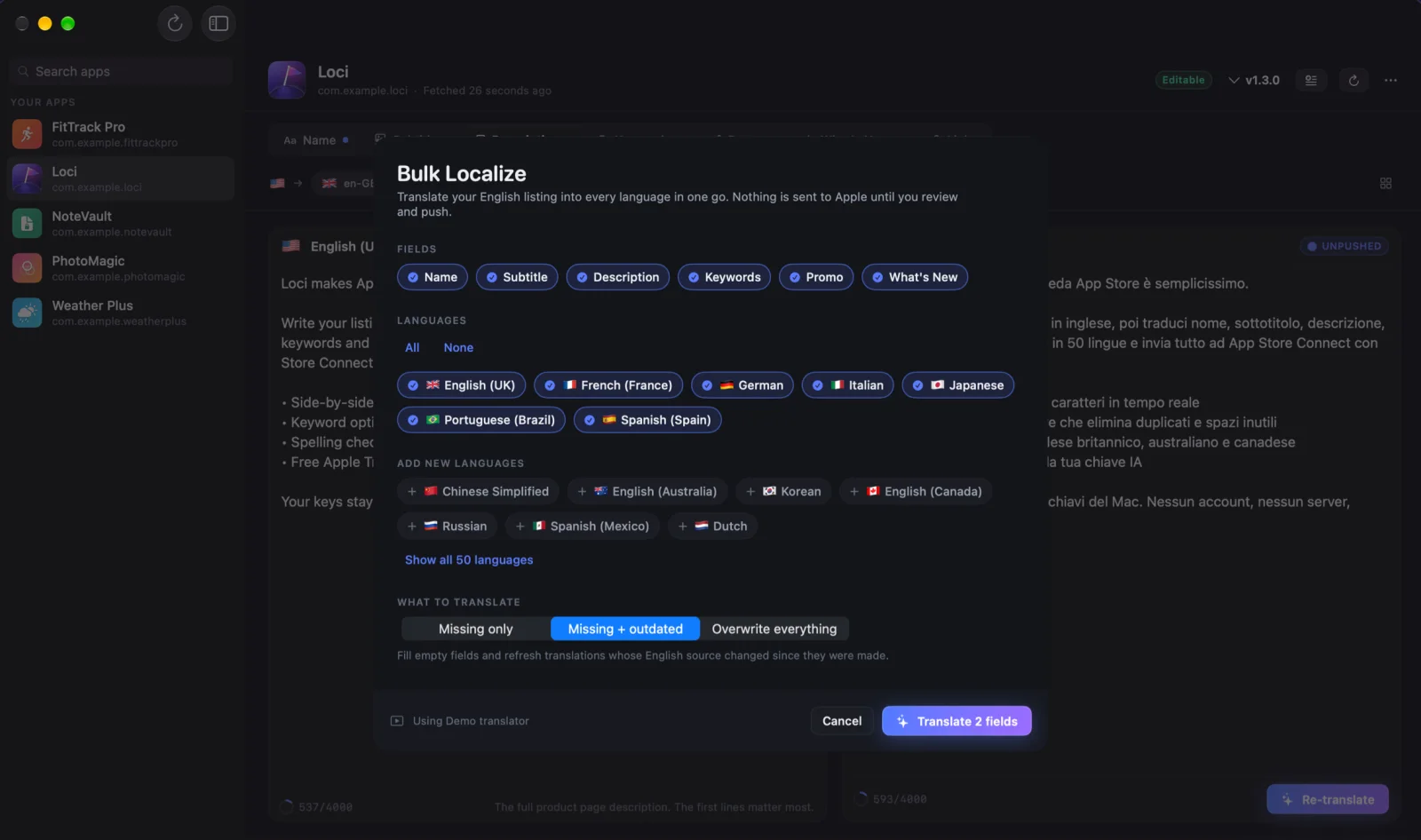
Pick languages and fields. Translate one field at a time, or everything at once with Bulk Localize, then edit anything you like.
- Step 3
Review and push
Loci lists every change by language, flags anything over a limit or misspelled for that region, and updates App Store Connect in one click.
New to App Store Connect API keys? Create one in two minutes. Or start in Demo Mode, no key needed.
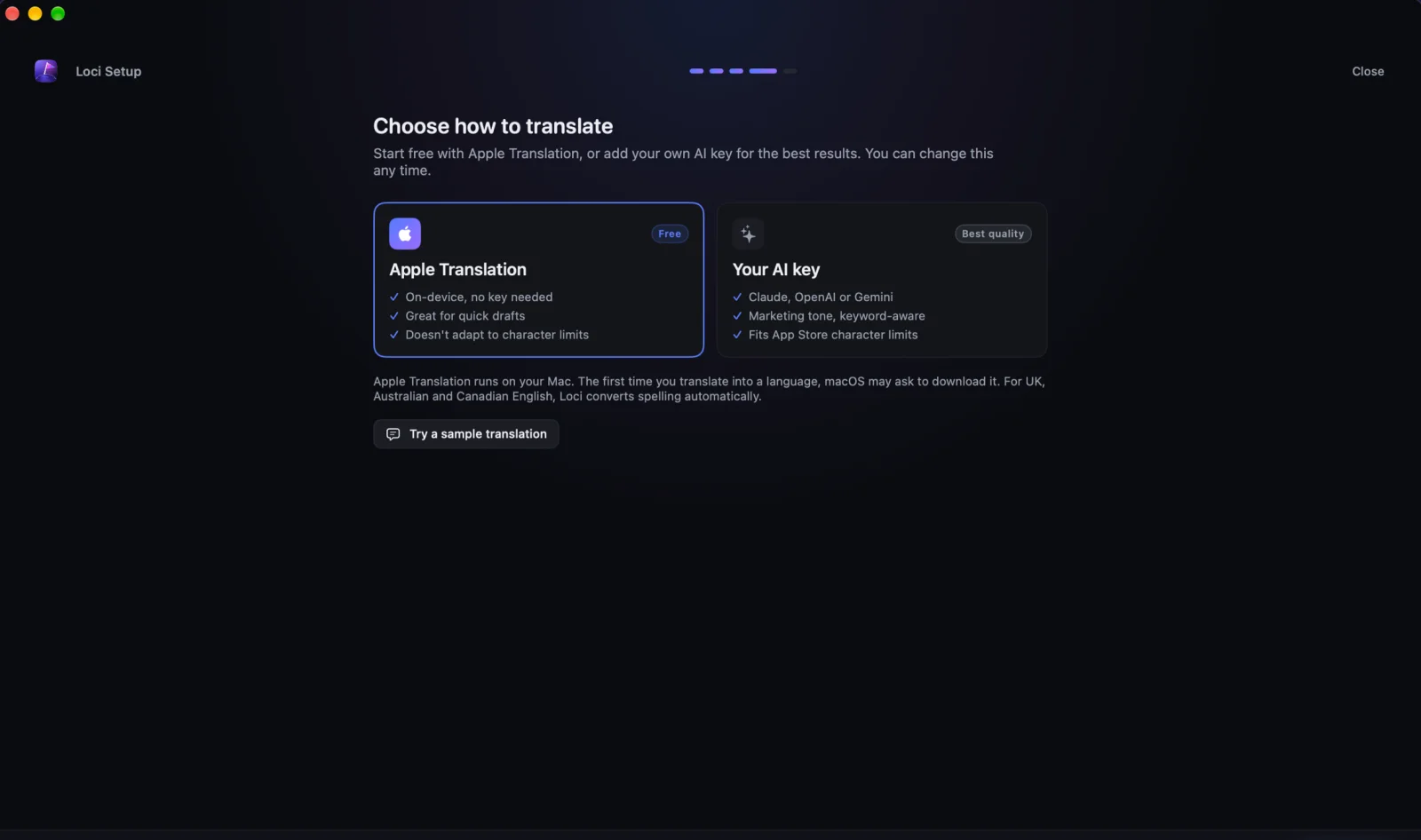
Free, or your own AI key
24/30 Subtitle
Apple's Translation framework runs on your Mac for free, for every language macOS can translate on-device (about 20 of the 50). For all 50, or when you want copy that reads like marketing and stays inside the limits, add your own Claude, OpenAI or Gemini key and give it your app's context. You pay the provider directly; there's no Loci subscription.
Your keys stay on your Mac
26/30 Subtitle
Loci has no accounts and no servers. Your App Store Connect key and any AI keys live in the macOS Keychain, and the app talks straight to Apple and to the provider you pick. The only thing we receive is anonymous usage counts, which you can switch off.
- Keys stored in the macOS Keychain
- Direct to Apple and your AI provider
- On-device Apple Translation
- Demo Mode without a key
What's in the app
17/30 Subtitle
- Connects to App Store Connect
- Loci loads your apps, versions and existing localizations through your own App Store Connect API key, and pushes every change back in one click. No copy-pasting into the web dashboard.
- Bulk Localize
- Translate the name, subtitle, description, keywords, promotional text and What's New into every language you choose, in one run.
- Review & Push
- Before anything reaches Apple, Loci checks character limits, keyword rules and UK, Australian and Canadian spelling, and offers one-click fixes. Fields that would be rejected are held back.
- A keyword editor that counts
- Keep each locale's keyword field inside 100 characters, with duplicates and wasted spaces removed for you.
- Game Center localization
- Translate achievement names and descriptions, leaderboard names and achievement images, and push them with the rest of the listing.
- Outdated detection
- Change your English in App Store Connect and Loci marks every translation made from the old text as Outdated, so nothing drifts out of date.
- Free Apple Translation, or your own AI
- Apple's Translation framework runs on your Mac for free, for every language macOS can translate on-device. Add your own Claude, OpenAI or Gemini key to cover all 50 languages with copy that reads like marketing and respects character limits. You pay the provider directly.
- CSV and JSON import and export
- Send any set of fields to a translator or a spreadsheet, one row per language, and import the result back.
All 50 App Store languages
26/30 Subtitle
Every language App Store Connect accepts for product page metadata, including the 11 Apple added in March 2026. See the full list with storefronts or which ones to do first.
ar-SAالعربية · Arabicbn-BDবাংলা · BanglacaCatalà · CatalancsČeština · CzechdaDansk · Danishde-DEDeutsch · GermanelΕλληνικά · Greeken-AUEnglish (AU) · English (Australia)en-CAEnglish (CA) · English (Canada)en-GBEnglish (UK)en-USEnglish (US)es-ESEspañol (ES) · Spanish (Spain)es-MXEspañol (MX) · Spanish (Mexico)fiSuomi · Finnishfr-CAFrançais (CA) · French (Canada)fr-FRFrançais · French (France)gu-INગુજરાતી · Gujaratiheעברית · Hebrewhiहिन्दी · HindihrHrvatski · CroatianhuMagyar · HungarianidBahasa Indonesia · IndonesianitItaliano · Italianja日本語 · Japanesekn-INಕನ್ನಡ · Kannadako한국어 · Koreanml-INമലയാളം · Malayalammr-INमराठी · MarathimsBahasa Melayu · Malaynl-NLNederlands · DutchnoNorsk · Norwegianor-INଓଡ଼ିଆ · Odiapa-INਪੰਜਾਬੀ · PunjabiplPolski · Polishpt-BRPortuguês (BR) · Portuguese (Brazil)pt-PTPortuguês (PT) · Portuguese (Portugal)roRomână · RomanianruРусский · RussianskSlovenčina · Slovaksl-SISlovenščina · SloveniansvSvenska · Swedishta-INதமிழ் · Tamilte-INతెలుగు · Teluguthไทย · ThaitrTürkçe · TurkishukУкраїнська · Ukrainianur-PKاردو · UrduviTiếng Việt · Vietnamesezh-Hans简体中文 · Chinese Simplifiedzh-Hant繁體中文 · Chinese Traditional
Guides
6/30 Subtitle
App Store localization: a practical guide for indie developers
App Store localization covers your name, subtitle, keywords, screenshots and more in up to 50 languages. What to localize, in what order, and what to avoid.
App Store character limits: every field in one table
App Store character limits for every field: name and subtitle 30, keywords 100, promotional text 170, description and What's New 4,000. Checked against Apple.
App Store Connect languages: all 50, with locale codes
App Store Connect languages: all 50 metadata localizations with API locale codes (en-US, zh-Hans, pt-BR), the 11 added in 2026, and where each shows.
What developers ask us
22/30 Subtitle
Something else? Email contact@karbs.dev.
What is Loci?
Loci is a Mac app for App Store localization. It translates your App Store Connect metadata into any of the 50 App Store languages and pushes it back to App Store Connect, checking character limits and keyword rules on the way.
What does Loci translate?
Every App Store Connect metadata field: App Name, Subtitle, Description, Keywords, Promotional Text and What's New, plus Game Center achievements and leaderboards. Privacy policy, support and marketing URLs are copied from your main language unless you override them.
Does Loci localize the strings inside my app?
No. Loci localizes your App Store product page, meaning the metadata in App Store Connect. The text inside your app (String Catalogs or Localizable.strings) is localized in Xcode.
Which languages are supported?
All 50 App Store Connect languages, including English (UK, Australia, Canada) with automatic spelling conversion, Simplified and Traditional Chinese, Arabic, Hebrew, and Indian languages such as Hindi, Tamil and Bangla.
Do I need an AI subscription?
No. Loci translates with Apple's free on-device Translation framework by default, which covers the languages macOS can translate (around 20 of the 50). For the rest, and for marketing-quality copy that stays inside character limits, add your own Claude, OpenAI or Gemini API key and pay the provider directly.
What do I need to connect to App Store Connect?
An App Store Connect API key (Issuer ID, Key ID and .p8 private key) with the App Manager or Admin role. Members of the Apple Developer Program can create one for free in App Store Connect under Users and Access → Integrations. Loci stores it only in your Mac's Keychain.
Does Loci work for iPhone and iPad apps?
Yes. Loci runs on the Mac, but it edits listings for any app in your App Store Connect account: iOS, iPadOS, macOS, tvOS, watchOS and visionOS.
Is my data sent to your servers?
No. Loci has no accounts and no servers. It talks directly from your Mac to Apple and, only if you choose, to your AI provider. The only thing it sends us is anonymous usage counts, which you can turn off in Settings.
Can I try it before connecting my account?
Yes. Demo Mode comes with sample apps, so you can try the editor, Bulk Localize and Review & Push without an API key.
Get Loci for your Mac
21/30 Subtitle
€8.99 once on the Mac App Store. Free Apple Translation built in. Try Demo Mode before you connect anything.
Mac app · macOS 15 or later
€8.99 once, no subscription